What "split" means
A split keyboard divides the keys into a left section and a right section. Canada's occupational safety centre notes that the design may let your arms and wrists point inward (opens in a new tab) without holding your elbows as close to the middle of your body.
The same source says there is no universally agreed best keyboard design and suggests trying different models. Keep that in mind as you read any list, including our split keyboards compared.
Three kinds you will see
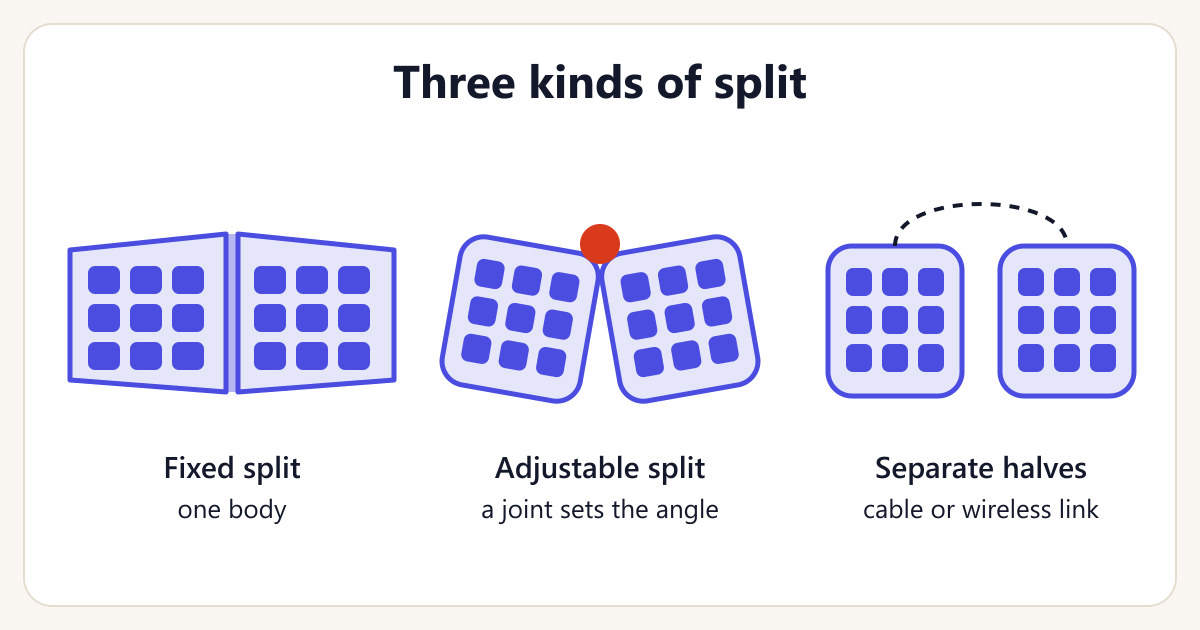
A fixed split keeps both halves in one body with a gap or angle between them. The Logitech ERGO K860 is one. An adjustable split lets you change the angle on a joint, as the Goldtouch Elite does. Separate halves can sit apart from each other, as on the Kinesis Freestyle2 or the Kinesis Advantage360 Professional.
| If you want | Kind to look at | What to check |
|---|---|---|
| The smallest change from a normal keyboard | Fixed split in one body | Whether the fixed angle feels natural to you |
| To set the angle yourself without two loose parts | Adjustable split | How the joint adjusts and how it locks |
| To set how far apart your hands sit | Two separate halves | How the halves connect to each other and to your computer |
| A curved shape but no gap | Not a split: look at wave-shaped boards | Whether a one-piece body is enough for you |
Questions worth asking first
Do you need a numeric keypad? Some boards build one in, some offer a separate unit, and many separate-half boards have none. Do you move between a laptop and a desktop? Then the number of devices a keyboard can pair with may matter more than shape.
Which operating system do you use? Our guide to operating-system compatibility explains how to read those claims. The Keyboard Finder treats your system as a must-have.
Where to put it on the desk
The same Canadian guidance says to place the keyboard directly in front of you, with relaxed shoulders, elbows close to your body and wrists straight in line with your forearms. Our workstation guide covers height and mouse position too.
Plan for an adjustment period
Even a fixed split asks you to type a little differently. Keys set in straight columns, compact layouts and separate halves ask for more. The Keyboard Finder has a "willingness to adapt" setting for this reason. If you want something familiar, it favors keyboards closer to a conventional layout and says so.
Angle is a separate choice from split. See keyboard tenting explained if you also want the keys to slope.
Common questions
Is a split keyboard better for everyone?
No keyboard design is agreed to be best for everyone. Treat a split as an option to try, not an upgrade that suits all people.
What is the difference between a split and a wave-shaped keyboard?
A split keyboard separates the keys into two groups. A wave-shaped board such as the Logitech Wave Keys curves the keys in one body, and its maker does not describe a split.
Do split keyboards have a number pad?
Some do. The ERGO K860 has one built in, the HP 960 has a separate one, and the Advantage360 Professional has none. Check each product page.
Are two separate halves harder to learn?
They can ask for more adjustment, especially with column-style keys. How long it takes differs from person to person, and we have no figure we can source.
Does split mean wireless?
No. The two are separate. Some split boards are wired only and some are wireless, so check the connection line on the product page.
What should you check before you buy?
Check your operating system, the connection, the keypad and the return terms. Then compare shapes.
A fixed split to start comparing from

We feature the Logitech ERGO K860 as a reference point for a fixed split: one body, a built-in number pad and an attached wrist rest. It is a full-size board, so check your desk space. We have not tested it; we read the maker's pages.
As of Nov 26, 2026, 1:02 AM PST. Product prices and availability are accurate as of the date/time indicated and are subject to change. Any price and availability information displayed on Amazon.com at the time of purchase will apply to the purchase of this product.
The Amazon link is an affiliate link. We may earn a fee if you buy, at no extra cost to you.
Sources and further reading
- Office Ergonomics: Keyboard Selection and Use (opens in a new tab), CCOHS. Supports: What a split design may allow, that no design is agreed as best, and where to place a keyboard.
- ERGO K860 product page (opens in a new tab), Logitech. Supports: The fixed split example.
- Elite keyboard product page (opens in a new tab), Goldtouch. Supports: The adjustable split example.
- Freestyle2 for PC product page (opens in a new tab), Kinesis. Supports: The separate halves example.
We opened these pages on November 26, 2026, except where a product page note gives an earlier date for a specification.
Find the split that fits your setup
Tell the Keyboard Finder your system, your keypad needs and how much change you want.