What tenting is
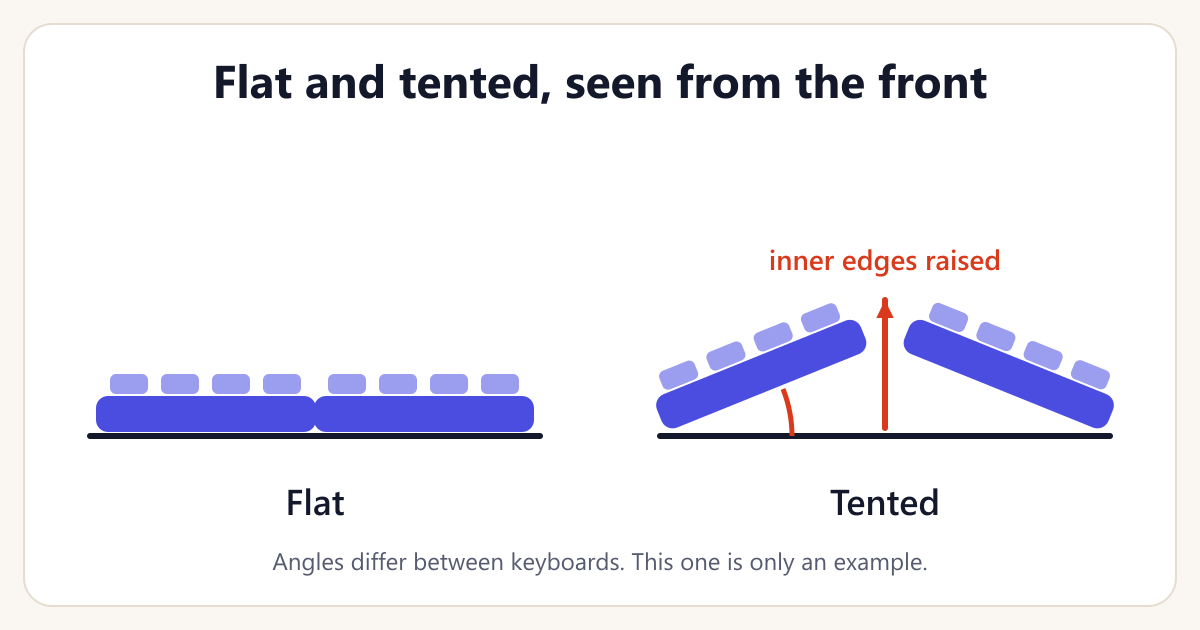
Tenting raises the inner edges of a keyboard so the keys slope away from the middle, like a low roof. It changes how far your forearms turn to rest on the keys.
Tenting is a comfort preference, and people settle on different angles. We do not claim any angle is better for health. It is a separate choice from splitting, which we cover in how to choose a split keyboard.
How makers describe it
Some makers give an angle. Goldtouch states a range of 0 to 60 degrees of tent (opens in a new tab) for the Goldtouch Elite. Kinesis states a 20 degree tent for the Advantage2, and has announced it is ending production of that model. Matias describes a 9 degree tent for the Ergo Pro.
Others use names. The Kinesis Advantage360 Professional has low, medium and high settings. The maker page we read does not give those angles, so we show three settings and no number.
| If you | Look for | Example in our catalog |
|---|---|---|
| Are still finding a comfortable angle | Adjustable tent | Goldtouch Elite, Advantage360 Professional |
| Want one setting and nothing to adjust | Fixed tent | Kinesis Advantage2 |
| Want to start flat and add a slope later | Optional tenting accessory | Kinesis Freestyle2 |
| Prefer a flat set of keys | No tent | Check the tenting line on each product page |
Fixed, adjustable or accessory
A fixed tent has one angle. An adjustable tent lets you change it. An accessory tent, such as the optional lifters for the Kinesis Freestyle2, adds a slope to a flat keyboard. The Freestyle2 and Goldtouch Elite comparison shows an accessory design next to a built-in one.
Tilt is not tenting
Tilt raises or lowers the front or back edge. The Logitech ERGO K860 has legs that give a negative tilt, so we record tilt and tenting separately. Canada's occupational safety centre suggests being able to raise either the back or the front of the keyboard (opens in a new tab), whichever helps keep your wrists in line with your forearms.
How we handle missing angles
When a maker says that a keyboard tents but not by how much, we say so. Our tables show "Not stated" instead of a number we worked out ourselves. The split keyboard list names a highest stated tent angle only among products that publish one.
Common questions
What does a tent angle measure?
It describes how steeply the keys slope from the middle toward the outer edge. Makers may measure in their own way, so compare numbers with care.
Is a bigger tent angle better?
Not by itself. A wider range gives you more positions to try. It does not show that a steeper setting will feel better.
Can you add tenting to a flat keyboard?
Sometimes. It depends on the maker offering an accessory, as Kinesis does for the Freestyle2. Check which accessory fits your exact model.
Do you need a split keyboard to use tenting?
The tented boards in our catalog are all split or contoured in some way. See the full keyboard list and filter by tenting.
How do you pick a starting angle?
We have no sourced figure for a best starting angle. If your keyboard adjusts, changing one step at a time makes it easier to judge each setting.
Why does a product show no angle?
The maker pages we read did not state one. We leave it unknown rather than estimate it from a photo.
A keyboard with built-in tent settings

Kinesis Advantage360 Professional
We feature the Kinesis Advantage360 Professional because it has three tent settings built in, so you can change position without adding a part. It is two separate halves with column-style keys, so expect to relearn some habits. The maker page we read gives no angles. We have not tested it; we read the maker's pages.
As of Nov 26, 2026, 1:02 AM PST. Product prices and availability are accurate as of the date/time indicated and are subject to change. Any price and availability information displayed on Amazon.com at the time of purchase will apply to the purchase of this product.
The Amazon link is an affiliate link. We may earn a fee if you buy, at no extra cost to you.
Sources and further reading
- Elite keyboard product page (opens in a new tab), Goldtouch. Supports: The 0 to 60 degree tent range.
- Advantage2 product page (opens in a new tab), Kinesis. Supports: The 20 degree tent and the end of production notice.
- Ergo Pro programmable product page (opens in a new tab), Matias. Supports: The 9 degree tent configuration.
- Advantage360 Professional product page (opens in a new tab), Kinesis. Supports: The three named tent settings.
- Office Ergonomics: Keyboard Selection and Use (opens in a new tab), CCOHS. Supports: Raising the front or back of a keyboard to keep the wrist in line with the forearm.
We opened these pages on November 26, 2026, except where a product page note gives an earlier date for a specification.
Match tenting to your other needs
The Keyboard Finder lets you ask for a flat, tented or adjustable keyboard along with your system and connection.