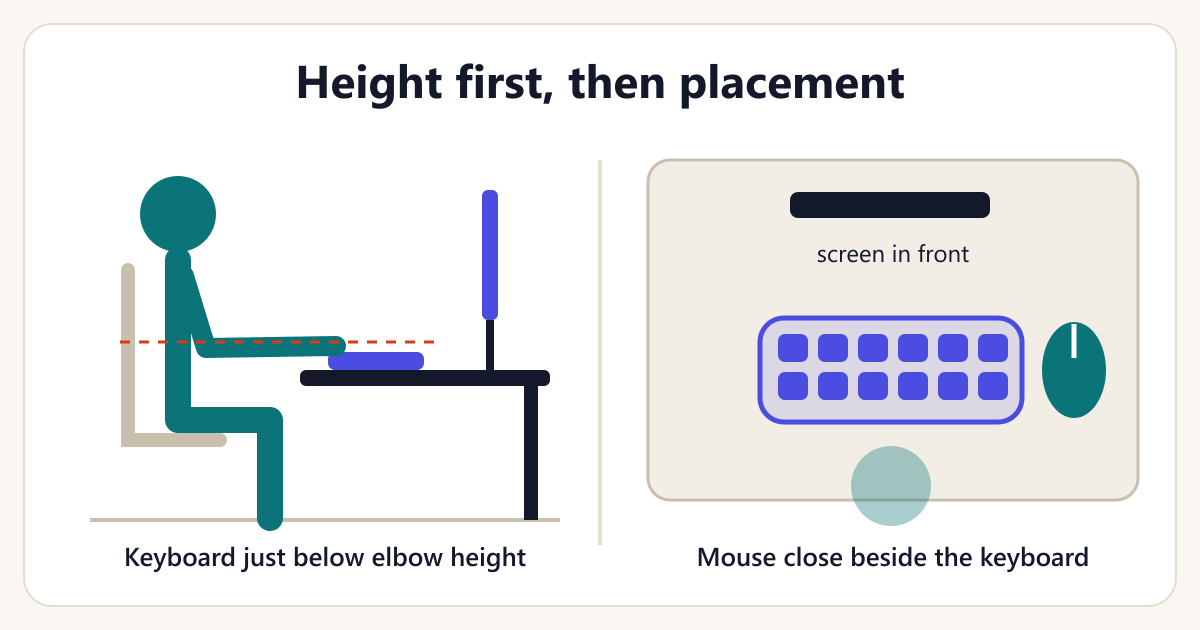
Start with height and position
The UK Health and Safety Executive suggests a keyboard just below elbow height and a mouse in line with your elbow (opens in a new tab), with the screen and keyboard centred so you do not twist. For laptop work over long periods, it suggests a separate keyboard and mouse.
Canada's occupational safety centre adds that elbows at about 90 to 110 degrees (opens in a new tab) help relax the shoulders and forearms, and that you should take short breaks.
Then the desk
A built-in number pad makes a keyboard wider, which can push your mouse further to the side. A board without one, or with a separate unit like the HP 960, lets the mouse sit closer. Measure your desk depth before choosing a large keyboard with an attached rest, such as the Logitech ERGO K860.
The Canadian centre says research on wrist rests is inconclusive, and that using one incorrectly can add pressure. Do not treat a rest as a must-have.
| Your situation | Check first | Where to look |
|---|---|---|
| Little room beside the keyboard | Keyboard width and the number pad | Keyboard product pages |
| Two or more computers | Device count and connection | Wireless keyboard list |
| Lots of number entry | A built-in or separate number pad | Keyboard Finder, keypad setting |
| Work from a laptop | A separate keyboard and mouse | Both finders |
Then the computers
With one computer, your choice is wide. If you switch between a laptop, a work computer and a tablet, look for a device that pairs with several, starting with our wireless keyboard list. Check each system too, using our compatibility guide.
Then how you work
Some people want programmable keys and compact layouts. Others want a number pad or something light to carry. The Keyboard Finder turns these into preferences and shows which ones each product met or missed.
For pointing, decide between shapes with vertical mouse or trackball, then run the Mouse Finder.
Change one thing at a time
If you change the keyboard and the mouse together, it is hard to tell which one made the difference. Start with the one that bothers you most and give it a fair trial. For shape choices, see our split keyboard guide.
If you have discomfort that does not go away, see a clinician. Equipment advice is not a substitute.
Common questions
Where should the keyboard go?
Public guidance puts it directly in front of you. Keep your elbows close to your body and your wrists straight with your forearms.
How high should the mouse be?
The UK guidance puts the mouse in line with your elbow. A desk or tray that adjusts can make this easier.
Do you need an ergonomic keyboard and mouse together?
No. Choose each on its own merits. You may only want to change one.
Does a compact keyboard help with mouse placement?
A narrower board leaves more room, so the mouse can sit closer to you. Check the width on the product page, such as for the Logitech Wave Keys.
Should you use a wrist rest?
Canadian guidance calls the research inconclusive. It also advises against resting your wrists on the desk surface.
Can a new device solve discomfort?
We make no such claim. Setup, breaks and your own health all play a part, so talk to a qualified professional about ongoing discomfort.
A keyboard with a movable number pad

HP 960 Ergonomic Wireless Keyboard
We feature the HP 960 because its number pad is a separate unit you can place where you want, or leave in a drawer. The pad is its own wireless device with its own batteries. We have not tested it; we read the maker's pages.
As of Nov 26, 2026, 1:02 AM PST. Product prices and availability are accurate as of the date/time indicated and are subject to change. Any price and availability information displayed on Amazon.com at the time of purchase will apply to the purchase of this product.
The Amazon link is an affiliate link. We may earn a fee if you buy, at no extra cost to you.
Sources and further reading
- Good posture when using display screen equipment (opens in a new tab), Health and Safety Executive (UK). Supports: Keyboard and mouse height, screen position and separate devices for laptop work.
- Office Ergonomics: Keyboard Selection and Use (opens in a new tab), CCOHS. Supports: Elbow angle, keyboard placement, shorter keyboards and short breaks.
- Office Ergonomics: Computer Mouse, Selection and Use (opens in a new tab), CCOHS. Supports: That research on wrist rests is inconclusive.
- Office Ergonomics: Computer Mouse, Location Between Keyboard and Operator (opens in a new tab), CCOHS. Supports: That reaching less to the side can improve working posture.
We opened these pages on November 26, 2026, except where a product page note gives an earlier date for a specification.
Plan your pair
Run the finders one at a time, starting with the device you want to change first.