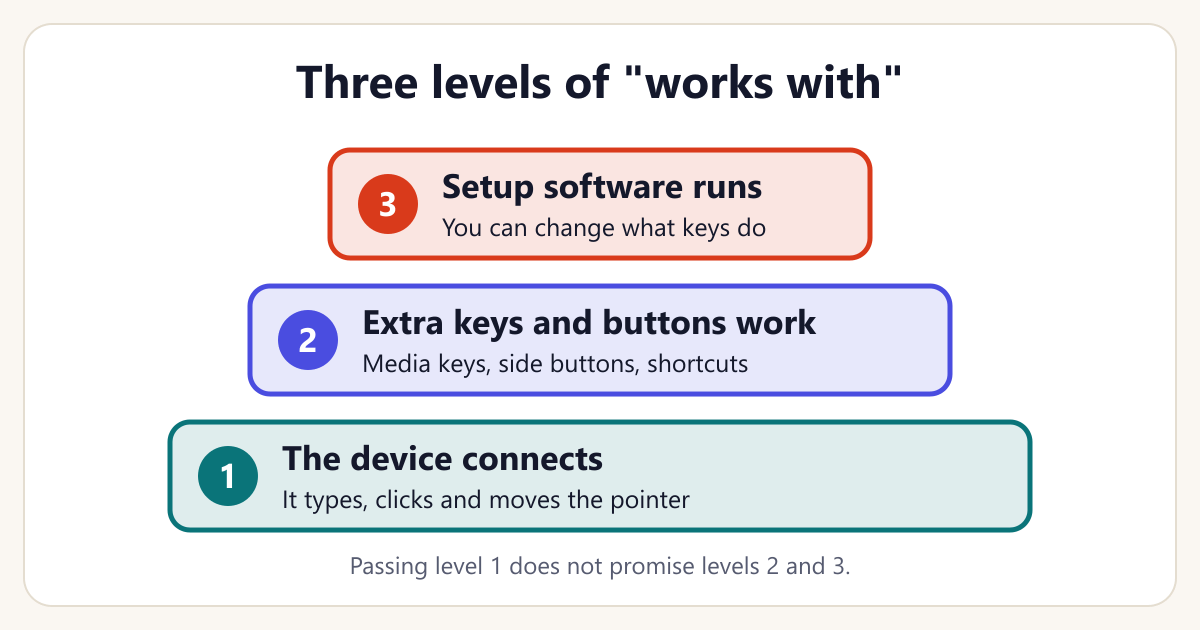
Three levels of compatibility
A device may connect and type or click on a system. Its extra keys and buttons may also work. And its configuration software may run there. A maker can promise the first without the other two.
| Question | Where to look | If it is not stated |
|---|---|---|
| Does it connect to my system? | The operating-system or system requirements line | Treat support as unconfirmed |
| Do the extra keys or buttons work? | Footnotes and compatibility notes | Assume you need to check with the maker |
| Does the setup software run? | The software download page | Plan on the default button functions |
| Will my connection type work? | The connection line and any receiver plug type | Check your computer's ports and Bluetooth |
Two examples from maker pages
Kinesis lists Linux for the Freestyle2 for PC with a note that multimedia and calculator keys do not work there (opens in a new tab).
Evoluent says its VerticalMouse 4 works with systems that support USB pointing devices (opens in a new tab), while its Mouse Manager software does not work on Mac OS, where the button functions are fixed. See the regular wireless model.
Read the software line
Remapping often depends on the maker's software or on tools built into your system. If you use Linux or ChromeOS, check whether you can change the buttons you care about, not just whether the device is listed.
The video below shows one way to deal with a common case, a Windows-style keyboard on a Mac.
Wireless and wired
The connection is part of compatibility. A USB receiver needs a matching port, and Bluetooth needs a computer that offers it. Canada's occupational safety centre also notes that a cordless mouse gives you more options for where to put it. For keyboards, see our wireless keyboard list.
What our finders do
The Keyboard Finder and Mouse Finder treat your operating system as a must-have. A device that does not list your system is ruled out. A device whose maker does not state support is shown as unconfirmed, with the gap named.
Our catalog covers US versions. Other regions can have different layouts and part numbers, so a product page here is not evidence about another country's version. If you are also choosing a shape, read how to choose a split keyboard.
Common questions
Does Bluetooth mean it works with everything?
No. Bluetooth is a way to connect. It does not promise that special keys or software work on your system.
Will a Windows keyboard work on a Mac?
It depends on the model. Check whether the maker lists macOS, then check key labels and whether you can reassign keys.
What does "unconfirmed" mean in your finders?
The maker pages we read do not state the fact you asked about. It does not mean the device fails.
Can you use one keyboard with several computers?
Some keyboards pair with more than one device. The Logitech ERGO K860 and others list a device count on their product page.
Is a Mac version always the same product?
Not always. Some makers sell separate Windows and Mac models, so match the exact model name. Our keyboard pages name the version we recorded.
Do operating-system updates change support?
They can. Our notes show what the maker stated on the date we checked, so confirm the current page before you buy.
A mouse with a long system list

Logitech Lift Vertical (right-handed)
We feature the Logitech Lift because its maker lists Windows, macOS, Linux, ChromeOS, iPadOS and Android. A listed system does not mean every software feature works there, so check the maker's software notes. We have not tested it; we read the maker's pages.
As of Nov 26, 2026, 1:02 AM PST. Product prices and availability are accurate as of the date/time indicated and are subject to change. Any price and availability information displayed on Amazon.com at the time of purchase will apply to the purchase of this product.
The Amazon link is an affiliate link. We may earn a fee if you buy, at no extra cost to you.
Sources and further reading
- Freestyle2 for PC product page (opens in a new tab), Kinesis. Supports: The Linux note about multimedia and calculator keys.
- VerticalMouse 4 Right Wireless product page (opens in a new tab), Evoluent. Supports: The USB pointing device statement and the Mouse Manager limits.
- Office Ergonomics: Computer Mouse, Selection and Use (opens in a new tab), CCOHS. Supports: That a cordless mouse increases the options for where to place it.
- Lift product page (opens in a new tab), Logitech. Supports: The featured mouse's listed systems.
We opened these pages on November 26, 2026, except where a product page note gives an earlier date for a specification.
Filter by your operating system
Start with your system in a finder, so nothing that lacks support slips onto your shortlist.